
Screenshots
App details
- Version
- 1.0.1.2
- Size
- 446.15 KB
- Updated
- July 30, 2025
- Requires
- Windows 7
- Language
- English
- License
- Free
- Developer
- Wintools
- Category
- Windows OS
SoftPas in:
This product is also available in the following languages:
About Explorer Commander
Download Explorer Commander – Free Dual-Pane File Manager for Windows
Explore the future of file management with Explorer Commander, a sleek, free, and secure file manager designed for Windows 10 and above. If you're tired of the limitations of the default Windows Explorer, this powerful tool offers a modern dual-pane interface that streamlines your workflow, enhances productivity, and brings a new level of control to your digital files. With just a 2.5 MB download, Explorer Commander delivers robust functionality without bloating your system. Whether you're organizing personal documents, transferring large media files, or managing project folders, this lightweight app makes every task faster and more intuitive.
Why Explorer Commander Stands Out in the File Management Space
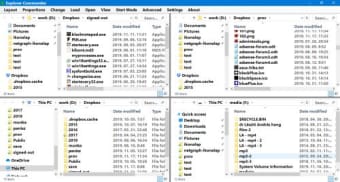
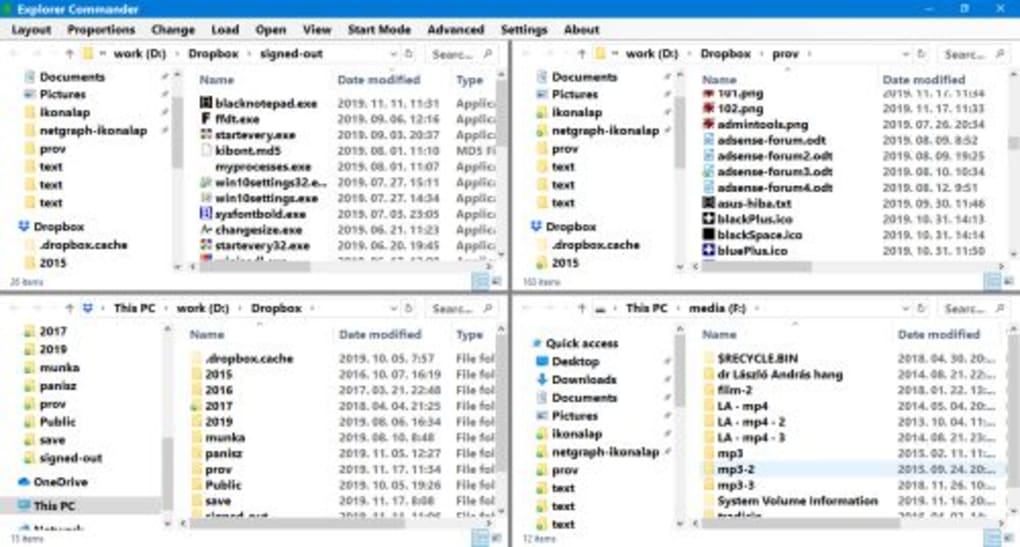
Explorer Commander is a free software tool that redefines how users interact with their files on Windows. Unlike traditional file explorers, it features a dual-pane layout that allows you to view and manage two directories simultaneously—perfect for copying, moving, or comparing files with just a few clicks. This isn't just a cosmetic upgrade; it's a functional leap forward in efficiency. Whether you're a student, creative professional, or IT user, this app adapts to your workflow seamlessly.
One of the standout aspects of Explorer Commander is its minimal footprint. At only 2.5 MB, it installs quickly and runs smoothly even on older machines. It’s built with performance in mind, ensuring that file operations like drag-and-drop, batch renaming, and folder synchronization are executed with speed and precision. The software is also fully portable, meaning you can run it from a USB drive without installation—ideal for users who work across multiple devices.
Security is another key focus. As a free tool from Wintools, Explorer Commander doesn’t collect user data or display intrusive ads. It operates entirely offline, making it a trusted choice for managing sensitive files. The latest version, 1.0.1.2, includes minor bug fixes and improved stability, ensuring a smooth experience. With over 10,000 downloads, it’s gaining recognition among users who value simplicity, speed, and reliability in file management tools.
Powerful Features That Enhance Your Daily Workflow
Explorer Commander isn’t just another file manager—it’s a productivity powerhouse. Its core feature, the dual-pane interface, is the game-changer. You can browse two folders side by side, drag files between them, and instantly compare file lists. This is especially useful when you’re archiving data, transferring files between drives, or syncing folders across devices. No more juggling multiple windows or losing track of your work.
Other notable features include built-in file preview (for images, documents, and media), customizable toolbar layouts, and keyboard shortcut support for power users. The app supports common file operations like copy, move, delete, rename, and create new folders—all with visual feedback and undo options. It also integrates with the Windows context menu, so you can right-click any file and open it directly in Explorer Commander.
For advanced users, the tool offers batch file renaming with regular expressions, file filtering, and a built-in search function that scans folder contents quickly. These features are particularly helpful when managing large collections of photos, videos, or code files. The interface is clean and intuitive, with minimal clutter, making it easy to learn even for beginners. Plus, since it’s available in English only, users worldwide can navigate it without language barriers.
- Dual-pane file browsing for efficient file management
- Lightweight design (only 2.5 MB)
- Portable mode – run from USB without installation
- Fast file operations with drag-and-drop support
- File preview for images, PDFs, and documents
- Batch renaming with regex support
- Customizable toolbar and keyboard shortcuts
- Integration with Windows context menu
- Secure, ad-free, and offline operation
Easy Installation & Seamless Usage on Windows
Getting started with Explorer Commander is a breeze. The download is free and takes just seconds due to its small 2.5 MB size. Once downloaded, you can either install it (for a desktop shortcut) or run it directly from the executable file—ideal for users who prefer portable apps. The setup process requires no configuration; the app launches instantly with default settings optimized for usability.
After launching, you’ll be greeted by the dual-pane interface. Each pane displays a folder hierarchy, and you can navigate by clicking or using the address bar. To copy files, simply drag them from one pane to the other. For renaming, right-click a file and select “Rename.” The app also supports keyboard shortcuts like Ctrl+C, Ctrl+V, and F2 for quick actions. If you want to customize the layout, go to the “View” menu and adjust the toolbar, icons, or pane size.
For users managing large projects, Explorer Commander’s file filtering and search tools are invaluable. You can filter files by type, size, or date modified, and search across folders in real time. The app also remembers your last viewed folders, so you can pick up where you left off. Since it’s lightweight and efficient, it won’t slow down your system, even when handling hundreds of files at once.
Compatibility & System Requirements
Explorer Commander is designed exclusively for Windows operating systems. It supports Windows 10 and all subsequent versions, including Windows 11. This ensures compatibility with modern hardware and security updates. The app does not require administrative rights to run, making it accessible even in restricted work environments.
It runs smoothly on both 32-bit and 64-bit systems, and since it’s a portable tool, you can use it on any Windows PC without leaving traces behind. There are no background processes or startup services, so it won’t interfere with your system’s performance. It’s also safe to use on laptops, desktops, and even in corporate networks where software restrictions are common.
While the app is currently only available for Windows, its functionality rivals that of more complex file managers found on other platforms. Future updates may include support for Mac or Linux, but for now, Windows users have a reliable, free, and secure alternative to the default file explorer.
- Operating System: Windows 10, Windows 11 (64-bit & 32-bit)
- File Size: 2.5 MB
- Language: English only
- License: Free (no trial, no ads)
- Portability: Fully portable – run from USB
- Updates: Regular updates for stability and performance
Pros & Cons: Is Explorer Commander Right for You?
Pros
- Free and ad-free file management tool
- Lightweight and fast, even on older systems
- Dual-pane interface boosts productivity
- Portable – no installation required
- Secure, offline operation with no data collection
- Intuitive design suitable for beginners and experts
- Supports batch renaming, file preview, and search
Cons
- Only available in English
- Limited to Windows platforms (no Mac or Linux)
- No built-in cloud integration (e.g., OneDrive, Google Drive)
- Basic interface—no advanced customization for themes
- No built-in compression tools (like ZIP or RAR)
FAQ: Your Questions Answered
Is Explorer Commander free to download and use?
Yes, Explorer Commander is completely free to download and use. There are no trials, no hidden fees, and no advertisements. It’s a fully functional file manager available at no cost to all Windows users.
Can I run Explorer Commander from a USB drive?
Absolutely. Explorer Commander is a portable application, meaning you can copy the executable file to a USB drive and run it directly from any Windows PC without installation. This makes it ideal for use on public or shared computers.
Does Explorer Commander support file compression like ZIP or RAR?
No, Explorer Commander does not include built-in tools for creating or extracting ZIP or RAR files. However, it works seamlessly with external tools like 7-Zip or WinRAR, which you can use in conjunction with the app.
Is Explorer Commander safe to use?
Yes, Explorer Commander is safe and secure. It’s developed by Wintools and does not collect user data, display ads, or install background services. It runs offline and is virus-free, making it a trusted choice for managing sensitive files.
Can I use Explorer Commander on Windows 11?
Yes, Explorer Commander is fully compatible with Windows 11. It has been tested and optimized for the latest Windows versions, ensuring smooth performance and full functionality.
Final Verdict: A Must-Try File Manager for Windows Users
Explorer Commander delivers a refreshing take on file management with its clean design, dual-pane interface, and lightweight performance. While it lacks some advanced features like cloud integration or built-in compression, its core functionality is solid, reliable, and free. For users who want a faster, more intuitive way to manage files on Windows 10 or 11, this app is a top-tier choice.
If you're looking to boost your productivity, reduce file management time, and enjoy a secure, ad-free experience, download Explorer Commander today. With over 10,000 downloads and a growing user base, it’s clear that this free tool is making a difference. Whether you're a casual user or a power user, it’s worth trying—especially when it’s completely free and easy to use.
Download Explorer Commander now and transform your file management experience on Windows.
Guides & Tutorials
How to install Explorer Commander
- Click the Download button above.
- Once redirected, accept the terms and click Install.
- Wait for the Explorer Commander download to finish on your device.
How to use Explorer Commander
This software is primarily used for its core features described above. Open the app after installation to explore its capabilities.
User Reviews
No reviews yet. Be the first to share your experience.
You may also like
more
Llama 2
Free-to-use large language model As the new addition to Meta’s arsenal of langua...

NotebookLM
Revolutionizing the note-taking and idea-generation process NotebookLM is an exp...

Github co pilot
AI-inspired software development and coding platform GitHub Copilot is a browser...

Google Gemma
Google’s lightweight AI models Introducing Google Gemma , a family of cutting-ed...

AI Image Enlarger
A free app for Windows, by ai-image-larger. AI Image Enlarger is a free software...

DALL E
AI-driven text-to-image transformation engine DALL·E is a free graphic and desig...